What should I do when my dishwasher is not draining well?
 Please Note: The information on this page is for Australian products only. Models, sequences, error codes or settings will vary depending on location and/or where the product had been purchased. To be redirected to your local support page please click here.
If your dishwasher isn't draining, you may need to check the filter or drain area inside the dishwasher first. In addition, information codes may appear on the display. This may happen because of an incorrectly installed drain hose. Make sure to keep the filter and drain area clean from any food or debris.
Read on to learn how to troubleshoot a Dishwasher that isn't draining well.
There are 3 components in the filtering system of your dishwasher, and it is important to clean the filters regularly to ensure proper removal of food particles from the water. Also ensure to check the sump area (D) for any trapped food particles and remove any foreign particles.
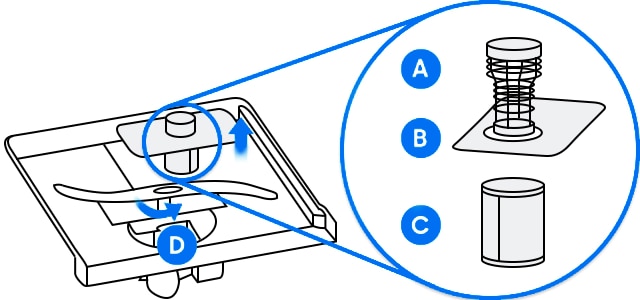
Note:
- Ensure you do not put the fine filter in upside down.
- You may wish to use protective gloves when removing the filters or check the sump area.
- The design of the pictured filter may slightly differ from the model that you have.
Ensure that the drain hose is straight, with no kinks or bends. Check the connection between the dishwasher and the sink carefully, making sure there are no gaps or leaks. If the connection is not correct or there are kinks and bends, a 5E or 5C error code may be displayed as well.
Click Here to learn more about information and error codes.

For further assistance, please contact our Chat Support. To find your Samsung product's User Manual, head to Manuals & Downloads.
Thank you for your feedback!
Please answer all questions.
Contact Info
Contact us
WhatsApp
![]()
![]()

