How to import and export Samsung Music playlists
Last Update date : Jul 28. 2026
Samsung Music gives you the power to backup and restore playlists at any time. Whether you change a device or reinstall Samsung Music, your music is always right where you left it.
How to use the Manage playlist setting
1
Run your Samsung Music app, tap on the more options icon, and then select “Settings”.
![Samsung music settings]()

2
Tap on “Manage playlists” at the bottom of the Samsung Music settings screen.
![Samsung music Manage playlists]()

3
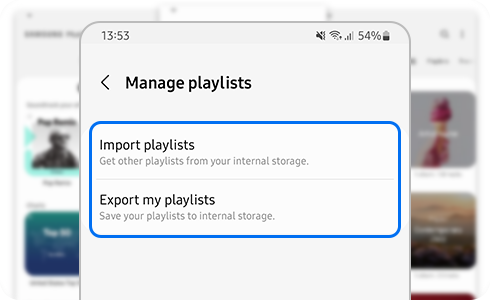
At “Manage playlists”, select the option you want to use between “Import playlists” or “Export my playlists”.
![Samsung music Manage playlists]()

What can I do with the Manage playlists setting?
- Import playlists:
Allows you to select from a list of backed up playlists to decide which ones you want to import.
- Export my playlists:
Allows you to back up and export all your playlists in your Samsung Music catalog.
For further assistance or questions, please Contact us.
Thank you for your feedback!
Please answer all questions.