How to assemble the bezel for your Samsung The Frame TV
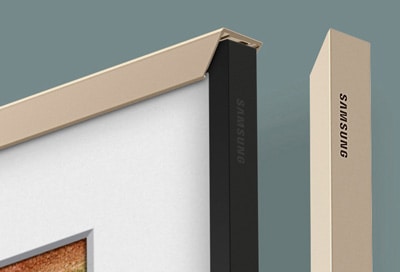
How to Attach a Bezel to Your Samsung The Frame TV
To attach a bezel to your Samsung The Frame TV, follow these simple steps. Bezels are sold separately and allow you to customize the look of your TV to match your room's aesthetic. This guide covers the process for most Samsung The Frame TV models, including recent releases.
1. What You'll Need
Before starting, ensure you have the following:
- The Frame TV model compatible with bezels
- Purchased bezel kit (sold separately)
- Clean, dry cloth (for dust removal)
2. Step-by-Step Assembly Guide
Follow these steps to attach the bezel to your Samsung The Frame TV:
- Power off your TV: Turn off your The Frame TV and unplug it from the power source.
- Remove the existing bezel (if applicable): If your TV already has a bezel attached, gently press the release buttons on the sides to detach it.
- Clean the TV frame: Wipe the TV frame area with a clean, dry cloth to remove any dust or debris.
- Align the new bezel: Take the new bezel and align it with the TV frame. Make sure the bezel's connectors are facing the correct direction.
- Attach the bezel: Press the bezel firmly into place until you hear a click, indicating it is securely attached.
- Check for alignment: Ensure the bezel is evenly aligned with the TV frame and sits flush against the screen.
3. Supported Samsung The Frame TV Models
Bezels are compatible with the following Samsung The Frame TV models:
- Samsung The Frame TV (2020–2024 models)
4. Additional Things to Check
If the bezel does not fit properly, consider the following:
- Ensure the bezel model matches your TV's size and shape.
- Verify that no dust or debris is obstructing the attachment points.
- Confirm that the bezel connectors are correctly aligned with the TV frame.
5. Why Bezels Are Important
Bezels enhance the aesthetic appeal of your Samsung The Frame TV, allowing it to blend seamlessly with your home decor. They also protect the TV's edges and provide a polished finish.
Related Samsung Support Topics
Thank you for your feedback!
Please answer all questions.