What does CF error code mean on Samsung AC?
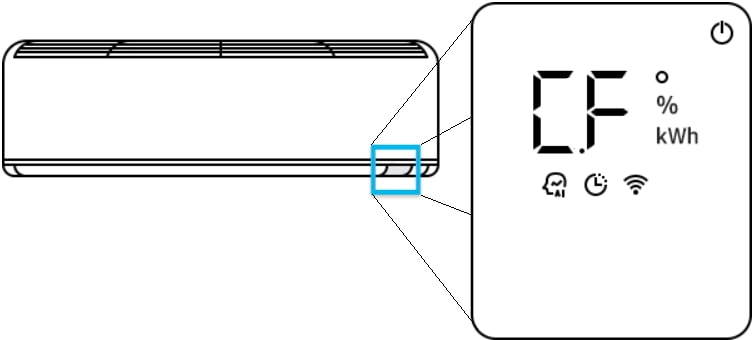
The CF error code on your Samsung AC indicates that the air filter requires cleaning. This alert appears when the filter becomes clogged with dust and debris, reducing airflow and efficiency. To resolve the issue, clean the filter thoroughly and reset the filter reminder through the control panel.
1. What Does the CF Error Code Mean on Samsung AC?
The CF error code signals that the air filter in your Samsung AC unit needs cleaning. This error is triggered when the system detects reduced airflow due to a dirty or clogged filter. Ignoring this warning can lead to decreased performance, higher energy consumption, and potential damage to the unit over time.
2. How to Clean the Air Filter
- Turn off the AC unit and disconnect it from the power source to ensure safety during cleaning.
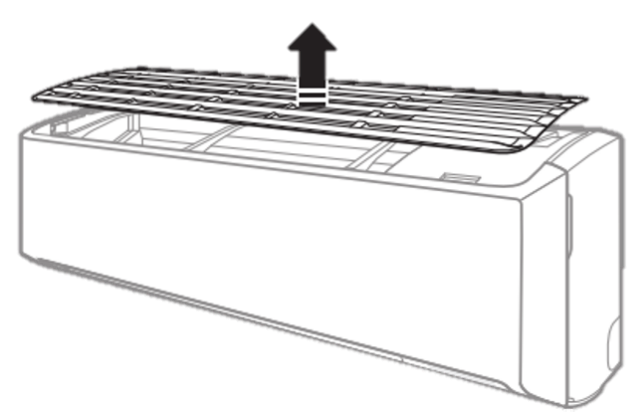
- Slide the air filter out of the unit by gently pulling it from its housing. Refer to your user manual if unsure about the location.
- Use a soft brush or vacuum cleaner to remove loose dust and debris from the filter surface.
- Prepare a mixture of warm water and mild detergent. Soak the filter in this solution for approximately 30 minutes to loosen stubborn dirt.
- Rinse the filter thoroughly under running water until no soap residue remains. Avoid using harsh chemicals or abrasive tools that could damage the filter material.
- Allow the filter to air dry completely in a well-ventilated area, away from direct sunlight or heat sources. Drying under sunlight can degrade the filter material over time.
- Once fully dry, reinstall the filter into the unit, ensuring it fits securely in place.
3. How to Reset the Filter Reminder
- Power on the AC unit and access the control panel.
- Press the Options button to enter the settings menu during operation.
- Use the arrow buttons to navigate and select Filter Reset from the available options.
- Confirm your selection by pressing SET or OK, depending on your model's interface.
- Note: The display panel design and navigation steps may vary slightly depending on your Samsung AC model. Consult your user manual for specific instructions if needed.
4. Additional Things to Check
- Ensure the filter is installed correctly after cleaning. A misaligned filter can still trigger the CF error code.
- Regularly inspect the filter every 1-2 months, especially during heavy usage periods like summer, to maintain optimal performance.
- If the CF error persists after cleaning and resetting, check for other potential issues such as a damaged filter or internal blockages in the airflow system.
5. Supported Samsung AC Models
The CF error code and cleaning procedures apply to most Samsung air conditioner models, including:
- Samsung Inverter ACs
- Samsung Split ACs
- Samsung Window ACs
For model-specific guidance, refer to your user manual or contact Samsung Support.
6. Why the CF Error Happens
- Dust and allergens accumulate on the filter over time, restricting airflow and triggering the CF error.
- Improper installation or use of a damaged filter can also cause the system to detect insufficient airflow.
- High usage frequency, such as continuous operation during hot weather, accelerates filter clogging.
7. Related Samsung Support Topics
Thank you for your feedback!
Please answer all questions.